Thursday, May 26, 2016

Gravity Screen Uses Sensors to Turn your Phone On, Off Automatically

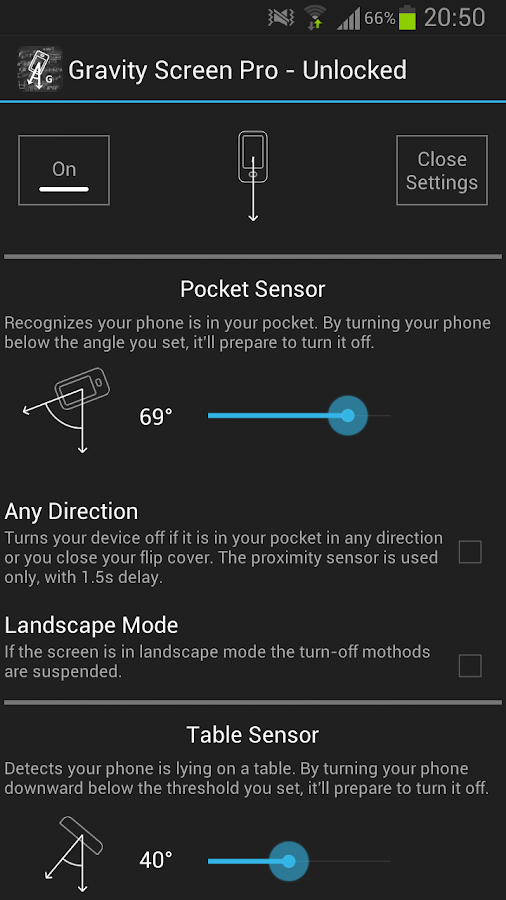
Gravity Screen - On/Off
 
It turns automatically the screen off when you put your phone into your pocket or onto a table. And turns the screen on when you take it out or up. No need to touch any button and you are ready to go. It's especially helpful if your lock key is hard to reach or the power button is broken.
 
  Gravity Screen - On/Off- screenshot   Gravity Screen - On/Off- screenshot  
 

Wednesday, May 25, 2016

Huawei P9 Full review

Huawei P9 Full review

Ask anyone of us who have used the Huawei P9 what we think, and we'll quickly tell you that it's the least broken of Huawei's phones that we've used. And while that's accurate — it's not really fair. There's a whole lot going on with this phone from a company that — let's face face it — non-nerds in North America haven't heard a whole lot about.
Huawei has made some really good (if not necessarily inspiring) hardware for some time now. The Nexus 6P. The Mate series. Its Honor sub-brand. It helped spread good fingerprint sensors to the whole of Android. It's had above-average cameras for a while now. The anchor dragging it down has always been its EMUI software — its iOS-inspired user interface.
That had as much to to with how EMUI was implemented as it did the fact that it's simply different than what most of us on Android are used to. No app drawer. A different sort of notification drawer and quick-settings scheme. And in the process of changing all that, things were broken — particularly when Huawei's phones were sold outside China and Google's services were added back in.
In fact, we need to change "least broken" to "really good." Pretty much all of the showstopping bugs we'd experienced before have been fixed. Even the still-niche Android Auto works out of the box — something we can't say for some of the major phones being sold in the U.S.
That's not to say this is a perfect phone, or maybe even the best Huawei has done. But it's probably the most complete thought from the Chinese manufacturer.

    • 5.2-inch IPS LCD
    • 2.5D glass
    • 1920x1080 resolution (423ppi)
  • Cameras:
    • Dual 12MP (color & monochrome), ƒ/2.2 lens, Leica certified
    • 8MP front camera
  • Battery:
    • 3000mAh capacity
    • Non-removable
  • Chips:
    • Huawei Kirin 955
    • Quad-core 2.5GHz
    • 3GB or 4GB RAM
    • 32 or 64GB internal storage
    • microSD slot

iPhone 6 Plus Review: Design

iPhone 6 Plus Review: Design 

Even Apple admits the iPhone 6 Plus and iPhone 6 are pretty much the same deal, save for the display size and addition of Optical Image Stabilisation on the Plus. They do look the same too, again, save for the Plus’ overall size and weight difference. A lot has already been said about the design of Apple’s new handsets, specifically, how thin the iPhone 6 Plus is (hello, bendgate) and the antenna bands that run around the back of both handsets. 
Personally, I rather like the look of both handsets. They’re thin, almost too thin in the iPhone 6 Plus’ case, feel premium to the touch, and are very easy on the eye. They both still look like iPhones, though, so if you weren’t a fan of the iPhone 5 or iPhone 5s chances are you’re not going to a fan of these devices, either. But if you do like impossibly thin handsets that are massive then the iPhone 6 Plus is perhaps right up your street. 
For a lot of traditional iPhone users the iPhone 6 Plus might be too big a jump from Apple’s usual 4in iPhones. I think this handset is aimed at pulling in Android users, as they’re used to using handsets of this size in their everyday lives. The strategy definitely worked too; Apple sold a HUGE amount of iPhones in 2014/15 and most new adopters, according to Tim Cook, came from Android.
I say, massive, and I really do mean it –– the iPhone 6 Plus feels positively enormous in the hand compared to handsets with similarly sized displays like the LG G3 and Samsung Galaxy Note 4. The reason for this is Apple’s huge bezels on the top and bottom of the phone, which add in an inch or two to the overall size of the handset. I get why the bottom bezel is so large –– it’s where TouchID lives –– but the top one… could that not have been reduced ever so slightly? Probably not as it’d screw the whole design of the phone up, but after testing A LOT of Android phones this year, there is definitely something to be said about large, phablet-sized panels and bezels that just get out of the way. Handle the LG G3 and then the iPhone 6 Plus and you’ll get what I’m on about. The difference in how the two phones handle is incredible, so much so you’d never believe they had the same size display. 
As I said earlier, design is subjective. Some people like phablets; others prefer handsets with displays under 5inches. I definitely fall into the latter camp, however, which is why I prefer the iPhone 6. And the reason for this is threefold: 1) I use my phone a lot, especially when on the move, so I prefer one I can use single-handedly; 2) I like a phone to fit snugly in my pocket, not take over the entire thing; and, 3) when a handset is too big, it feels unstable in my hand and I constantly worry about dropping it.
The drop-worry is a real issue, again, this is a big phone, and a thin phone, with rounded and smooth aluminium edges. It doesn't take a doctorate in physics to figure out why this might be a problem; getting a good grip on this device can be tricky and I constantly felt like it was about to fly out of my hand. 
Exact measurements for the iPhone 6 Plus are 158.1 x 77.8 x 7.1 mm and it weighs 179g. As previously noted, the iPhone 6 Plus feels impossibly thin, however, to fully appreciate this aspect you really do have to handle one, so be sure to pop into your nearest Apple Store or phone shop to check it out. Aside from this the overall finish, look and styling of the handset is pretty much flawless –– Apple knows how to make good-looking phones and tablets.
As a phablet, though, I do think Apple has bitten off more than it can chew which is common mistake made by a lot of manufacturers when tackling the troublesome phablet phone. Take Samsung: it’s taken a good few generations of its Note device to really nail the design and overall experience, so much so that nowadays, with the Galaxy Note 4, which, by the way, has a larger display than the iPhone 6 Plus, you feel like you’re using a smaller handset than you actually are… and the main reason for this is because Samsung actually tried to figure out HOW to build a phone experience around a larger-than-normal display, not just make a bigger version of its Galaxy S handset. And that’s the big difference here, really.  
The iPhone 6 Plus, like the Galaxy Note 4, is still an excellent piece of kit. And if you’ve been waiting for Apple to do something similar to what’s been going on in the Android space for what seems like eons now, the iPhone 6 Plus will be a largely rewarding experience. I would suggest before committing to either the iPhone 6 or the iPhone 6 Plus that you try each out –– ahead of testing I was all about the iPhone 6 Plus, but after two weeks with both I am now firmly of the opinion that the iPhone 6, with its smaller 4.7in display, is the one for me. 
Design’s subjective, so make sure you make the right choice for you, and the only way to be 100% sure about which is the best fit for your needs is to try everything out before purchase. Beyond size, the iPhone 6 and iPhone 6 Plus, in the grand scheme of things, are identical, so all it really boils down to is how big do you want it? 

iPhone 6 Plus Review: Display 

The iPhone 6 Plus uses a 5.5in IPS LCD panel with a display resolution of 1080 x 1920 pixels, which translates into a pixel density of 401 ppi. Compared to handsets like the LG G3 and the Galaxy Note 4, that’s quite a shortfall, but the panel itself is very capable, producing exact colour reproduction and contrast. Viewing angles are also good, and the reduction of space between the actual display-glass and the pixels themselves makes for a more immersive viewing experience –– it feels like you’re touching pixels. 
The iPhone 6 Plus’ display is better than the iPhone 6’s setup, both on paper and in the flesh. It outperformed every other LCD panel ever tested by Display Mate too, which is no mean feat considering the competition its up against and the fact the analysis company has been testing panels since 2006. 
“The new 5.5-inch iPhone reached or broke records in a variety of areas, including highest peak brightness, lowest screen reflectance, highest contrast ratio, highest contrast rating in ambient light, most accurate intensity scale and gamma and most accurate image contrast.”
So, yeah, the iPhone 6 Plus might not have the QHD pixel count, but it sure as sugar makes up for it in other areas that are, arguably, more important to the average user in any given normal usage case scenario. The larger panel also means the iPhone 6 Plus is better suited for watching films and TV shows and playing games like BioShock. 
Overall display quality is also one key area where Apple could easily differentiate the two handsets as well… because beyond size, as I’ve said multiple times already, there really isn’t much to separate these two handsets. Technically the iPhone 6 Plus has the superior panel. But realistically the difference in everyday settings is fairly unimpressive, with both panels producing excellent results in nearly every setting. 
One slight issue I do have with the iPhone 6 Plus’ larger, higher resolution display is to do with applications. Basically, a lot of core applications have not been updated for the iPhone 6 Plus’ higher resolution display, and the result is pixelated applications which look bloody horrific. During our testing period, one of the worst offenders, annoyingly, was one of our most-used apps, Whatsapp. Urghhh! Still, in a matter of weeks, this issue will likely be a moot point as more and more developers update their applications. Even so, it’s still a valid issue and is definitely worth a mention in the context of this review, as it was one of the first things I noticed when I first started using the Plus.
The new LG G5 review

LG phones often play it safe, but this modular G5, which lets you swap out some parts, is all risk. I love the innovation -- no other company has gotten this far with a modular phone -- but unfortunately the device falls short on execution.
Swapping out parts means you turn off your smartphone each time, and there just aren't enough modules right now to make this truly captivating. (LG is selling two components, but they don't pique my interest all that much.) Maybe if there were more inspired modules, and more partners on board lining up cooler add-ons -- I love the idea of a swappable camera lens, for example -- I could be more excited about the G5, or at least more forgiving of its growing pains.
But it's not all bad news. Forget the modules and the device is the best handset with a removable battery, which is becoming a rarity in the phone world. Its aluminium build looks and feels great, and the two cameras on its back are a pleasure to use.
Overall, the G5 still isn't as good as Samsung's Galaxy S7 and S7 Edge when it comes to processing speed and battery life, but it'll work very well for all the things you really need to do: take photos, browse the internet, and watch videos throughout the day.

Design: This is not your modular fantasy

When LG first showed off the G5, it made a big deal of it being the first phone with modular capabilities. This ability to swap out and customize certain hardware parts has been a longtime fantasy for mobile users. Like building a personal computer, you can upgrade certain components that are important to you or fit a certain need. If you're going somewhere where you're going to take a variety of photos, for example, you might want to swap out your handset's stock lens for a fisheye or macro lens.
To use the feature, you'll need to push the small button on the device's left edge. The bottom of the G5 will pop out, allowing you to yank the attachment off the battery, clip the battery into the new module and push it all back together. Because the battery is attached to the bezel, the handset powers down every time you swap something out. This isn't a huge deal, but it takes time to fire up the phone after a switch, and if you swap parts often throughout the day it can be a power drain.
lg-g5-6164.jpg

Google attempted to make a modular handset with its Project Ara, but development on that stalled. The fact that LG got this off the ground is a win, but the feature is limited for now because there are only two accessories (so far) that take advantage of it.
One is called the Cam Plus. It's a camera grip that has a physical shutter button to record and capture video, and a zooming wheel. It also has a built-in battery, which you can use on top of the phone's battery for extra juice. The other accessory is the Hi-Fi Plus, a portable digital-to-analog converter (DAC) that boosts audio playback for high-definition sound files. Because the Hi-Fi Plus includes an audio grill, a USB Type-C port and a 3.5mm headphone jack, you can leave it attached to your G5 and use it all the time.
The LG Cam Plus camera grip, which can attach to the handset. James Martin/CNET
Swapping out the bottom bezel was a bit difficult at first. The pieces fit tightly, and the unlock button that lets you to detach the chin lies flush with the surface of the device, so I had to dig my nail in to press it. After a while, I got the hang of it and got faster at swapping the parts out. That doesn't mean I ever got to the point where I could walk around, stop and switch out the bezel casually. There's still some wrangling involved, and due to the sheer fear that I'd accidentally fling the top part of the handset across the room when I pulled out the chin, I felt compelled to find a place to sit down to switch out the parts.
With these two official add-ons and no plans to make more, LG will need to rely on third-party developers to expand the usefulness of the phone's current modular features. As a top-tier handset in and of itself, the G5 is a great device. But solely in terms of modularity, it has a ways to go.

HTC 10 review - the perfect 10

HTC 10 review - the perfect 10

The most personalised take on Android yet and a huge improvement on the One M9, but the HTC 10 still has a few minor flaws holding it back
2016
HTC 10 display
569

Page 1 of 3HTC 10 review - the perfect 10

Specifications

Processor: Quad-core 2.2GHz Qualcomm Snapdragon 820, Screen Size: 5.2in, Screen resolution: 2,560x1,440, Rear camera: 12 megapixels, Storage (free): 32GB (23.9GB), Wireless data: 3G, 4G, Size: 146x72x9.0mm, Weight: 161g, Operating system: Android 6.0.1
See all of the best HTC 10 deals on uSwitch
The HTC One M9 played second fiddle to all its rivals last year. Its camera was dreadful, its battery life was severely sub-par and its nigh-on identical design to its predecessor, the One M8, meant it was left standing in the M8's shadow rather than stealing its own piece of the limelight. In fact, it was only when HTC released its second-tier One A9 last autumn that it felt like this once great smartphone giant was getting back on track.
HTC's clearly taken this to heart for its new HTC 10, as it shares a striking resemblance to its A-series sibling. Both share the same slim antenna lines, which run across the top and bottom of a full metal unibody, and they each have an almost identical fingerprint sensor incorporated into the home button on the front. However, it doesn't take much to see where the HTC 10 breaks away from the A9's school of design, as those huge, chamfered edges look absolutely stunning against the A9's flat, uniform finish, and the way they catch the light immediately draws the eye.
HTC 10 rear edge

Design and fingerprint sensor

The Glacier Silver model shows it best, revealing at least three different shades of silver when placed face down on a table, but the Topaz Gold and Carbon Grey are both equally handsome in their own way. Regardless of which one you pick, it's definitely more attractive than LG's rather plain-looking G5, and its all-metal exterior looks a damn-sight smarter than the fingerprint-marred glass rears of Samsung's Galaxy S7 and S7 Edge handsets. This is what a flagship smartphone should look like – premium, stylish and not looking like it's been through a hedge backwards.
It's slim, too, measuring just 3mm at its thinnest point. Admittedly, this stretches to a rather chunky 9mm at its centre, but its simultaneously rounded and angular back feels great in the hand. It provides just the right amount of grip without feeling too sharp, and its skightly heftier weight of 161g makes it feel secure to hold and sturdily built.
HTC 10 rear
The HTC 10 isn't just a better-looking phone than the One A9, though, as it also addresses some of that handset's major shortcomings. For instance, despite having a fingerprint sensor that doubled up as a home button, the One A9 still had onscreen buttons for the Back and Recents keys. The HTC 10, however, finally makes a return to capacitative buttons, freeing up more space on the screen for your apps and video files while also making a lot more sense than the One A9's mixed setup.
That said, I still don't find front-facing fingerprints sensors hugely practical, as they can be a bit of a pain to reach when using the phone one-handed. Indeed, the HTC 10 often didn't recognise my thumb when I placed it on the sensor horizontally, instead demanding that I have the full, central portion of my thumb firmly on the main contact point.
It worked better when placing my thumb on it vertically, but it's still nowhere near as convenient as other rear-facing sensors I've used, such as the one on the LG G5. That said, having one on the front still has its uses. It's much easier to use when the phone's lying flat on a table, for example, and once Android Pay eventually launches in the UK, rear-facing sensors may become quite awkward to authorise payments with when you're also tapping your phone on an NFC reader.
HTC 10 buttons

Peripherals (or lack thereof)

Admittedly, the HTC 10 is probably the only flagship Android smartphone this year that hasn't been designed with hundreds of peripherals in mind. The LG G5, for instance, has several different modules you can attach to the bottom of the phone, such as the Cam Plus (which adds a wedge-like camera grip and physical buttons to the back of the phone) and Hi-Fi Plus (which adds Hi-res audio playback as well as a dedicated DAC for your music), as well as dedicated 'Friends' devices including the 360 Cam and 360 VR headset. 
The Galaxy S7 and S7 Edge don't have quite as many options as the G5, but even these phones are compatible with Samsung's Gear VR headset and its upcoming Gear 360 cam. With no such devices currently in the pipeline for the HTC 10, this leaves it feeling decidedly less flexible than its rivals.
However, it's worth noting that HTC already has a VR headset - the rather excellent HTC Vive - so it seems unlikely that it will make and release another one for mobiles in the near future. The HTC 10 also already comes with Hi-res audio support, negating the need for a separate £150 module like the G5. I'm not that convinced about LG's Cam Plus grip either, so the only thing the HTC 10's really lacking is a proper 360-degree camera accessory.
That said, it's always possible HTC might release a 360-degree successor to its periscope-like Re camera at some point in the future, but even if it doesn't release another version of the Re, LG's 360 Cam device works across all Android devices, so HTC 10 buyers won't be left wanting when it comes to 360-degree video footage. 

Performance

One thing the HTC 10 isn't short on is raw processing power, as it's got one of Qualcomm's brand-new quad-core 2.3GHz Snapdragon 820 chips inside it. It's also got 4GB of RAM, putting it neck-and-neck with the LG G5. However, it couldn't quite match the G5 when it came to running our Geekbench 3 benchmarks, as the HTC 10 only scored 2,022 in the single core test and 5,091 in the multicore test, putting it 300 points behind the G5 in each one. This makes it the slowest smartphone out of the big three, as Samsung's Galaxy S7 was even further in front for the multicore test, finishing with a huge score of 6,437.
Not that you'd probably notice the difference in everyday use, however, as the HTC 10 still felt incredibly quick and nippy when browsing the web, scoring an impressive 1,503 in Peacekeeper, and swiping through its Android homescreens was slick and responsive.

Get the Samsung Galaxy S7 with the plan that gives you more extras at no extra charge.

Specifications

Display
  • 5.1"
  • 2560 x 1440 pixels
Size and Weight
  • 5.61 x 2.74 x 0.31 inches
  • 5.36 ounces
Samsung Galaxy S7
Operating System and Processor
  • Android 6.0 Marshmallow
  • Qualcomm® Snapdragon™ 820 processor
Battery Life
  • Up to 28 hours talk time
  • Up to 12 days standby time
Camera, Photos and Video
  • 12 MP Rear Facing Camera
  • 5MP Front Facing Camera
Memory
  • 4GB RAM / 32GB ROM, expandable up to 200GB (sold separately)
Connectivity
  • Sync methods: Wi-Fi 802.11 a/ac/b/g/n, USB, LTE, UMTS/HSPA+ 42Mbps & LTE
  • 4G Capable
  • 4G LTE Capable
  • Wi-Fi Calling
Audio and Multimedia
  • T-Mobile TV
GPS and Apps
  • GPS enabled
International
  • Quad Band GSM; LTE: 1, 2, 3, 4, 5, 7, 12, 13, 20; UMTS: Band I (2100), Band II (1900), Band IV (1700/2100), Band V (850)
Hearing Aid Compatibility
  • M4 & T3
WEA Capable
  • Yes
Mobile Pay
  • Compatible with Android Pay
  • Compatible with Samsung Pay
In The Box
  • Galaxy S7
  • USB Cable
  • Wall Adapter
  • Smart Switch Adapter
  • Stereo Headset
  • Start Guide